
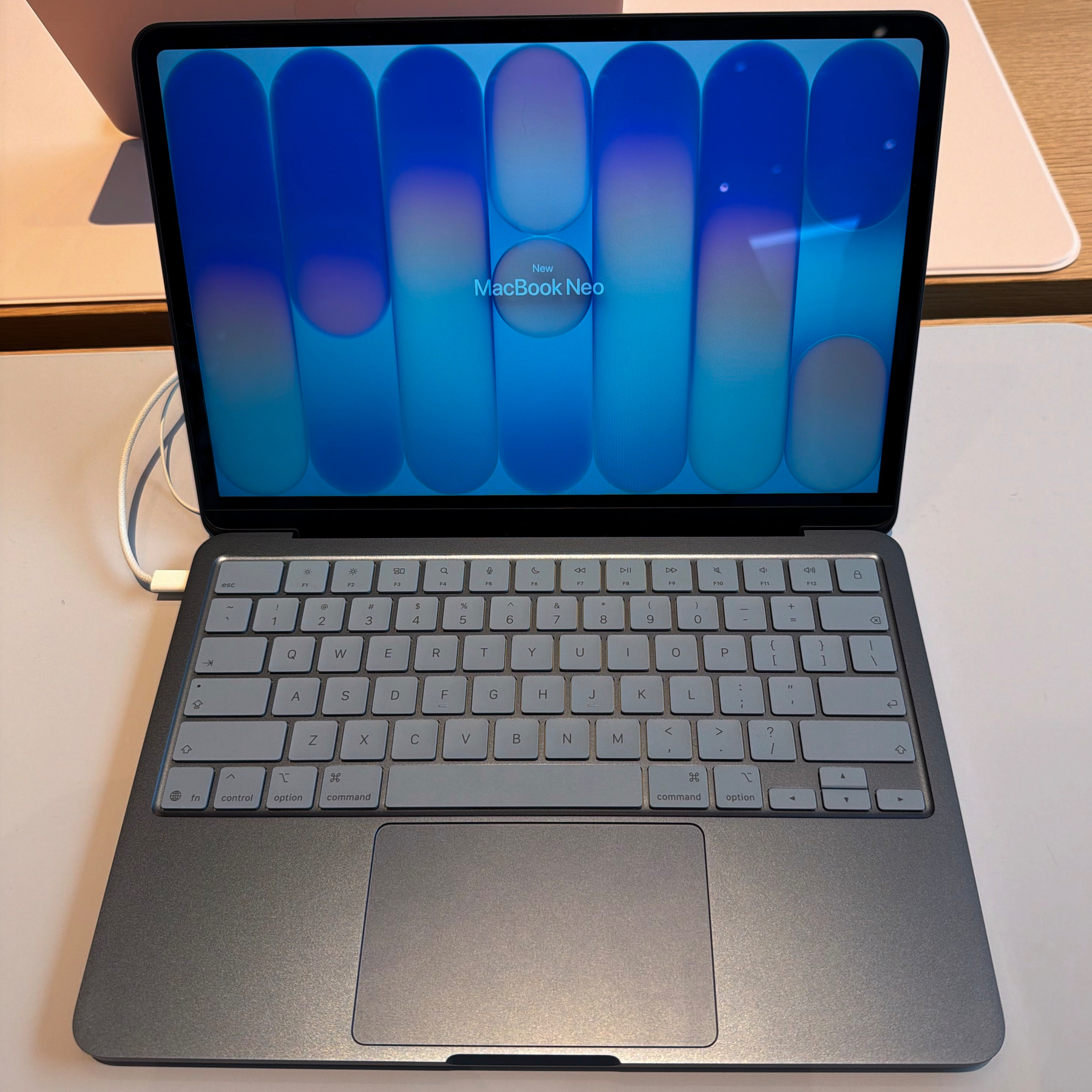
Photo taken at my local Apple Store
Today, I opened the Apple Store app on my iPhone to see if either of the two Apple stores near my house had the new MacBook Neo in stock . No luck. Both locations said they were unavailable in-store but could be ordered for pickup on March 19, 2026. I closed the app and figured it just wasn’t meant to be.
I’ve been looking for a small laptop for travel and on-site tech jobs . Originally, I considered a refurbished Lenovo Thinkpad X1 Carbon for around $500, which is roughly the starting price of the new MacBook Neo. I never pulled the trigger because it meant running Windows or Linux. While I’d prefer Linux over Windows, most of my tools and workflows are tailored to the Mac. So, when Apple announced the MacBook Neo, it seemed like the perfect device at the right price point.
Later that day after work, my wife and I ended up at the mall . Curiosity got the better of me, so I dropped into the Apple Store. Even if they didn’t have any to sell, I could at least see the Neo in person and decide if I actually liked it. The store was packed as usual, and the staff was busy. My wife and I wandered around until we spotted the four colors of the new MacBook Neo all the way in the back, right next to the Vision Pro area and made our way there.
I started playing with the display models. I picked them up, typed a bit, and opened and closed the lids (the standard things we all do when checking out a new computer) . I already knew I didn’t want yellow or pink, leaving me with silver or blue. The silver option wasn’t my favorite because of its white keyboard. I used to have a white Magic Keyboard, and man, those keys got dirty over time. I definitely didn’t want a repeat of that .
So, that left exactly one option: the blue Neo with its blue-tinted, non-backlit keyboard. After testing it out a bit longer, an Apple employee finished up with another customer and asked if I needed help. I asked, “Do you guys happen to have one of these in stock? Not the base model, but the one with Touch ID?” He politely said he didn’t know but would find out. He radioed another employee on his headset, and within seconds, they confirmed they actually had some in the back. I mentioned that the app said they were sold out, but they just shrugged it off. I guess the lesson here is to go check availability yourself, if you can.
Right then and there, I decided to pick up the blue MacBook Neo with Touch ID and 512GB of storage. There is no option to upgrade the RAM, so I am unfortunately stuck with 8GB. I figured the base RAM wouldn’t be a dealbreaker. This is primarily a single-purpose machine for travel and on-site work, mostly involving remote connections to servers or client desktops. It is nothing super intense, and I trusted the Neo could handle it perfectly. I bought it, brought it home, and started the setup process.
It didn’t come fully charged out of the box (about 80%, I think), so I plugged it in during the initial setup until it hit 100%. After three hours of installing apps, setting up services, logging into accounts, and playing with it a little more, the battery had only dropped by 12%. I think that is pretty good, if you ask mee.
Build-wise, the MacBook Neo feels like a solid, premium computer. There is none of that creaky, plasticky vibe you usually associate with “budget” laptops . It feels just as well-built as my M1 MacBook Pro or any other modern MacBook I’ve used . It is unmistakably an Apple product. The hinge is incredibly smooth, and yes, you can open it easily with one hand. Although, I think it is a bit looser than my other MacBooks because I picked it up one-handed from the table and the screen flung as far back as it could. This has only happened once, but it is something I will keep an eye on.
The keyboard is comfortable and responsive, very similar to an Air or a Pro . However, there are a few drawbacks where you can tell Apple cut corners to hit that $599 to $699 price point. For instance, the keyboard isn’t backlit. Additionally, while the screen is impressively bright, it lacks an ambient light sensor. It won’t automatically dim in a dark room; you have to adjust it manually. If you forget, you might just burn your retinas out, which I experienced a bit of today.
Touch ID works wonderfully, and the machine is no slouch when it comes to speed . Aside from a few momentary stalls during the initial setup (likely from indexing files in the background), I experienced zero slowdowns. Granted, I was only installing apps, logging into services, and downloading my iCloud Drive content. It wasn’t a heavy workload, but that’s exactly the kind of work I bought it for. For my needs, it has performed flawlessly, so far.
I was initially worried about the trackpad since it is a physical, mechanical pad that you actually have to push down on rather than a haptic one . Fortunately, it feels just as good as Apple’s other trackpads. All my accessibility gestures, like zooming in and out, work perfectly, just as they do on my MacBook Pro or Magic Trackpad. I haven’t tested the webcam yet, but I honestly don’t plan on using it much anyway. I am sure it will be fine for the few times I may use it..
The Wi-Fi speeds at home maxed out just like any other laptop or iPad I own . Even during my setup process, the laptop stayed completely cool. It got slightly warm while charging, but never uncomfortably so.
Overall, I am really happy with my choice. It is going to serve my purposes extremely well, and for the price, it is a heck of a deal . I strongly recommend the MacBook Neo to anyone who needs a highly portable machine for light use. I can definitely see lots of people enjoying this laptop and pushing it to the max with absolutely no regrets.
#Apple #MacBookNeo