
Mastodon

Posts in "tech"

What I Don't Like About the reMarkable Paper Pro Move

Here are some things that I don’t like about the reMarkable Paper Pro Move.

  • The hefty price tag. At close to $650 for the tablet, pen, and folio bundle (including sales tax), it’s a significant investment.

  • Poor accessibility for visually impaired users. As someone with visual impairment, I find the menus extremely difficult to see, if I can see them at all. The background templates—like lined, grid, or dot paper—are virtually impossible for me to make out. This means I frequently need assistance from a sighted person or my assistive technology to navigate basic functions.

  • The subscription model. The $2.99 monthly fee for reMarkable’s Connect service is a sticking point for many users, myself included. However, the more I use it, the more I appreciate its benefits. With the free 100-day trial, I suspect it’ll become indispensable, and I’ll gladly pay for it once the trial ends.

  • Constant passcode entry. I understand the security reasoning, but having to enter the passcode every time I wake the tablet becomes tedious quickly.

  • My handwriting somehow gets worse. This one’s a “me” issue, but I don’t like how I write on the tablet. You’d think it would feel just like writing on paper, but for some reason, my handwriting actually deteriorates on the device.

  • Tiny menu fonts. The menus use incredibly small fonts that even some sighted people in my life struggle with—though maybe that’s because they’re over 40 years “young.” (See what I did there?)

  • It’s not silent like paper. While I dislike the click-clacking sound my iPad makes when writing on glass, this tablet produces similar noises. It’s not the mostly silent experience of writing on actual paper. Perhaps I need to write with a lighter touch—time will tell.

  • Durability concerns for daily use. I plan to carry this tablet everywhere, but it feels fragile with no IP rating for dust or water protection. I’m not planning beach trips or rain writing sessions, but it rains almost daily where I live, and sometimes I have to dash from my car to work. For this price point, I wish it offered some weather and dust protection.

  • Zoom lag issues. Since I need to zoom in on my writing periodically, I’ve noticed the tablet occasionally lags during this function. Sometimes it takes two or three attempts before it responds to my zoom gesture.
What I Like About the reMarkable Paper Pro Move

Here are the things I like about my new reMarkable Paper Pro Move, in no specific order.

  • It is small and portable. You can easily take it anywhere, especially in your EDC bag or purse.
  • Its compact size makes it convenient to carry everywhere with you. It even works out great on your bedside table since it does not take up a lot of room.
  • The pen has a nice weight to it and feels premium all around. It’s also super responsive.
  • The tablet itself is very responsive in everything I tried, from navigating the menus to seeing the ink appear on screen as you write. This also feels like a premium product.
  • I love the fact that the pen has a built-in “eraser.” All you have to do is flip it around like you would with a regular old-fashioned pencil to use it.
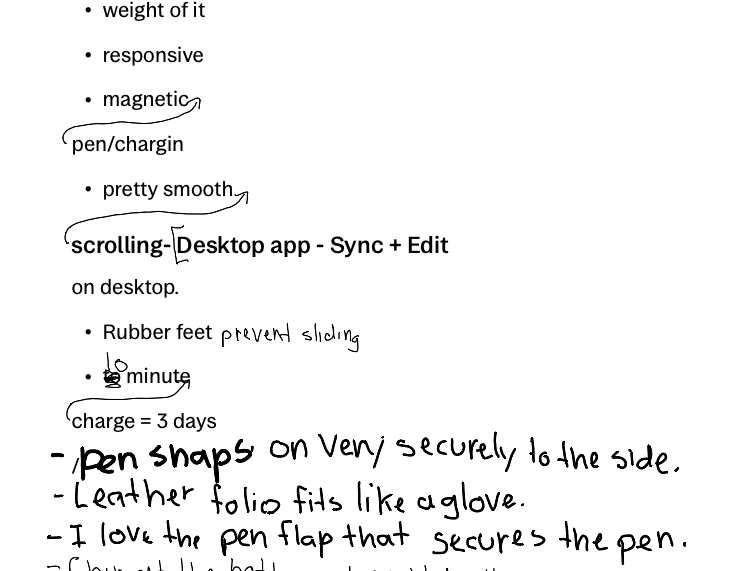
  • The handwriting-to-text conversion is fast and pretty accurate overall. It does make mistakes, but I think that has more to do with my bad handwriting (see screenshot below).
  • Being able to magnetically attach the pen to the side and have it charge is fantastic.
  • Two-finger scrolling of the page is very smooth for the most part.
  • Outward pinch to zoom in to your writing is great, especially when details are important.
  • The desktop app, paired with the Paper Pro Move and their Connect service, is nice. Syncing is generally fast, but sometimes I had to close the app and restart it to see changes. This was rare, but it did happen to me a couple of times.
  • Simple detail, but I like that it has rubber feet on the back, so it doesn’t slide when you write on it while it sits on your desk without the folio.
  • I haven’t verified this, but supposedly a 10-minute charge will give you 3 days of use.
  • The leather folio is excellent. It fits like a glove, and the magnets are strong and secure the tablet very well. I love the flap that conveniently fits over the pen to secure it with magnets. I also like the way it tucks behind when you have it open and are using the Paper Pro Move.
  • A lot of people complain about the paid Connect service that reMarkable offers, but I think it’s cool that they offer the first 100 days for free.

Tomorrow, I will share the things I do not like about the tablet, so don’t be shy and come on by.

reMarkable Paper Pro Move Update

I ordered the reMarkable Paper Pro Move from Amazon the other day and was expecting to receive it this upcoming Tuesday. Then I found out it was available locally at Best Buy. I quickly checked the order status on Amazon and, since it hadn’t shipped yet, I cancelled it and reordered it. I got it this past Friday, instead. Four days earlier.

At this point, I’ve had it for just over 24 hours but haven’t put it down for any length of time while awake. At first, I was just forcing myself to use it. I was writing down anything and everything I could think of. I even played tic-tac-toe with my wife as she rolled her eyes. Just kidding—she was a great sport about it. I thought it was cool but was still on the fence about it. I told myself I would sleep on it and decide whether it was worth the investment. Don’t get me wrong, the technology and premise behind it is great, but I have to make my decision from the perspective of a visually impaired person. I love tech, but it has to work for me. So far, this wasn’t really doing it for me because the UI wasn’t set up for a person with low vision. It’s too small, and since it was new to me, I hadn’t developed any kind of muscle memory to navigate it with any sort of ease or proficiency. In fact, it was frustrating me.

Well, I slept on it and woke up thinking of returning it when I second-guessed myself and decided I just hadn’t spent enough time with it yet. I really wanted it to work for me but hadn’t found justification to keep it. So I decided to grab it from my nightstand and write a list of pros and cons right on the tablet, which I did.

I am still finalizing the list, so come by tomorrow and check it out.

reMarkable Paper Pro Move

The reMarkable Paper Pro Move was recently released and I ordered one to try out. I should receive it in a few days.

Here are some things I think I’ll like about it

  • The size and form factor
  • The ability to use it in portrait or landscape mode (with auto-rotation)
  • Battery life that lasts two weeks on a single charge
  • Seamless syncing across devices like my iPhone, iPad, and laptop

Things I’m hesitant about

  • No IP rating for water/dust resistance
  • Plastic back construction
  • Small menus and limited accessibility features beyond note zooming
  • Screen refresh rate performance
  • The $600+ price tag (with folio bundle and tax)

Home Automation

Home Assistant + Ubiquiti + AI = Home Automation Magic

It seems like every manufacturer of anything electrical that goes in the house wants to be part of the IoT story these days. Further, they all want their own app, which means you have to go to gazillions of bespoke software products to control your things. And they’re all - with very few exceptions - terrible:

Unfortunately, the quote above nails it right on the head. Every manufacturer out there seems to want you to use their app to control things around your house—from your AC unit to the lightbulbs to your water leak sensors. It’s gotten to the point where we may need an entire screen or folder full of these types of apps. All users really want is a central app that can control everything. Luckily, Home Assistant gets you most of the way there.

Of course, you do have to set it up on a Raspberry Pi or an old computer, but once you do, you’re off to the races. If you don’t have the expertise for that sort of DIY project or you just don’t want to take the time to set it all up yourself, you can buy a Home Assistant appliance that’s mostly plug-and-play.

We use HA on a Raspberry Pi at our house to control almost everything in our IoT network, mostly to control our lights with timers or dusk-to-dawn sensors. We haven’t gotten as far as controlling our hose’s water flow, but that seems pretty cool to do. Halloween is coming around soon—I’m just saying.

SCO Is Celebrating 20 Years

I cannot believe that one of my favorite sites, ScreenCastsOnline, is 20 years old. I have been with them for most of that time. Although it has gone through some changes lately, it still remains great at what it has always offered… high quality tutorials for lots of apps and services. Thank you ScreenCastsOnline team! Keep it coming.

Check out Lee (current SCO owner) interview Don, the man who started it all back in 2005.

SIGN UP for a 7-day ScreenCastsONLINE trial membership TODAY and get access to our WHOLE CATALOG of over 1,460 videos.

Origin of the Apple Logo 

Interesting BGR article on the origin of the Apple logo.

Sleek, simple, and instantly recognizable, Apple’s logo became one of the most recognizable symbols in the world.

Some of the things I found interesting…

  • Steve Jobs chose “Apple” while on a fruitarian diet after visiting an apple orchard.
  • The first logo in 1976, Featured Newton under an apple tree, added by Wozniak to symbolize innovation.
  • The Turing theory was Debunked. The myth that the bitten apple honors Turing (who died with a half-eaten apple nearby) is false.
  • The rainbow colors indicated the new color display Macintosh, not a tribute to Pride or Turing.
  • Designer Rob Janoff denies Newton and biblical interpretations. While he finds the Turing story compelling, he’d never heard of Turing when creating the logo.

Pay to Pause Service

Starlink Users Will Now Have to Pay $5 to Pause Service

Starlink is ending a popular free feature that let customers pause service at any time for free. Now, you’ll have to pay $5 a month to enter what the company is calling “Standby Mode.”

A few years ago, I was excited when I heard that Starlink was coming to my area. I signed up and waited almost a year on their waiting list before they finally shipped the equipment. This was Starlink Generation 2 with the rectangular dish. The gear was pretty pricey, but I thought the technology was impressive, so I decided to take the risk.

When I first signed up, service was $99 a month, and I was getting a consistent 250 Mbps download speed, which was awesome. It was really competitive with my Comcast connection at the time, and I thought I’d replace my home internet entirely. But then I noticed some limitations—no dedicated IP address, and if I remember correctly, no way to bypass their included router at the time. I could be wrong about that, but I’m pretty sure that was the case.

So I downgraded Starlink from my primary internet to backup internet, then eventually just to camping internet. At that point, it was perfect for our needs. We took it camping to remote areas with no cell signal or other internet options, and Starlink delivered exactly what we needed. I kept the residential subscription, which billed me $100 every month whether I used it or not, but the price seemed reasonable.

Then the pricing started creeping up slowly. If I remember correctly, it went from $99 to around $110 or $120, then kept increasing. I think it’s now up to $150 or $160. The only reason I stuck with it was the ability to pause service at no cost and reactivate it whenever needed—for camping trips, internet outages at home, or hurricane preparation.

But now they’re putting another nail in their coffin because you can no longer pause service for free. They’re now charging $5 a month just for standby mode. In other words, they’re charging me for not using their service. That doesn’t sit right with me. They claim standby mode includes limited data for calls and software updates, capped at around 500 Kbps.

Don’t get me wrong—$5 isn’t a big deal in the grand scheme of things. But it’s the principle of nickel-and-diming customers every way they can. I understand their company exists to make money, but don’t do it at the expense of loyal customers who’ve been with you for years. Honestly, I think they should have grandfathered early users like me into the original $99 plan instead of nearly doubling the price just a few years later.

Right now, I still have Starlink as part of my camping and emergency preparedness gear. But if pricing keeps climbing and wireless carriers continue expanding coverage, I’ll definitely reconsider. As soon as I see a viable alternative, I might jump ship. We’ll see if Starlink can earn the right to keep me as a customer.

Apple’s first Mac with 5G cellular might be coming sooner than we thought

Rumors have long indicated Apple intends to bring cellular connectivity to the Mac, but a new report indicates the first cellular Mac might be right around the corner: the M5 MacBook Pro.

I know these are only rumors at this point, so take everything with a grain of salt—but man, I would jump on a 5G-enabled Mac in a heartbeat! I absolutely love my M4 iPad Pro with 5G as it stands now, and I would be thrilled to have an always-connected MacBook Pro (or MacBook Air).

Come on, Apple… make it happen already!

Building An iOS App With Only ChatGPT 5

Stephen Robles, one of my favorite YouTubers with no programming background, recently used ChatGPT 5 to create and successfully publish an iOS app to the App Store. Here’s how it went down:

  • Built the entire app using AI-generated code
  • Got rejected by Apple on first submission
  • Used GPT again to analyze and fix the rejection issues
  • Resubmitted and got approved

While Robles admits this was more of a proof-of-concept than a fully-featured app, the fact that he pulled it off is pretty impressive. Apparently, some developers weren’t too happy about his approach, though.

I would love to know what you guys think, especially you professional developers out there. Could this “AI-assisted coding” approach actually produce useful apps with real functionality, or will they always be limited to simple proof-of-concept projects? What dangers, if any, do you foresee when non-developers create apps in this manner? Let me know below.

Follow Me On Mastodon | Buy Me A Coffee