
Mastodon

Posts in "tech"

Raspberry Pi 500+

Raspberry Pi 500+ puts the Pi, 16GB of RAM, and a real SSD in a mechanical keyboard

The Raspberry Pi 500 (and 400) systems are versions of the Raspberry Pi built for people who use the Raspberry Pi as a general-purpose computer rather than a hobbyist appliance.

The Raspberry Pi has always been one of my favorite little computers. They’re perfect for quick projects and ideal for deployment to non-technical people who just need a basic computer for email, word processing, and similar tasks.

The 400 and now the 500 models take things a step further by integrating everything into a keyboard. Having a complete computer built right into a keyboard is pretty neat, in my opinion.

The main drawback has always been their reliance on SD cards (micro SD cards, to be exact). However, the new 500 series offers a compelling $200 option that includes a built-in 256GB SSD and 16GB of RAM. That combination makes it very attractive.

I’m constantly working on small projects to experiment with new ideas, and I think this could be a great addition to my toolkit.
Motorized Office Chair

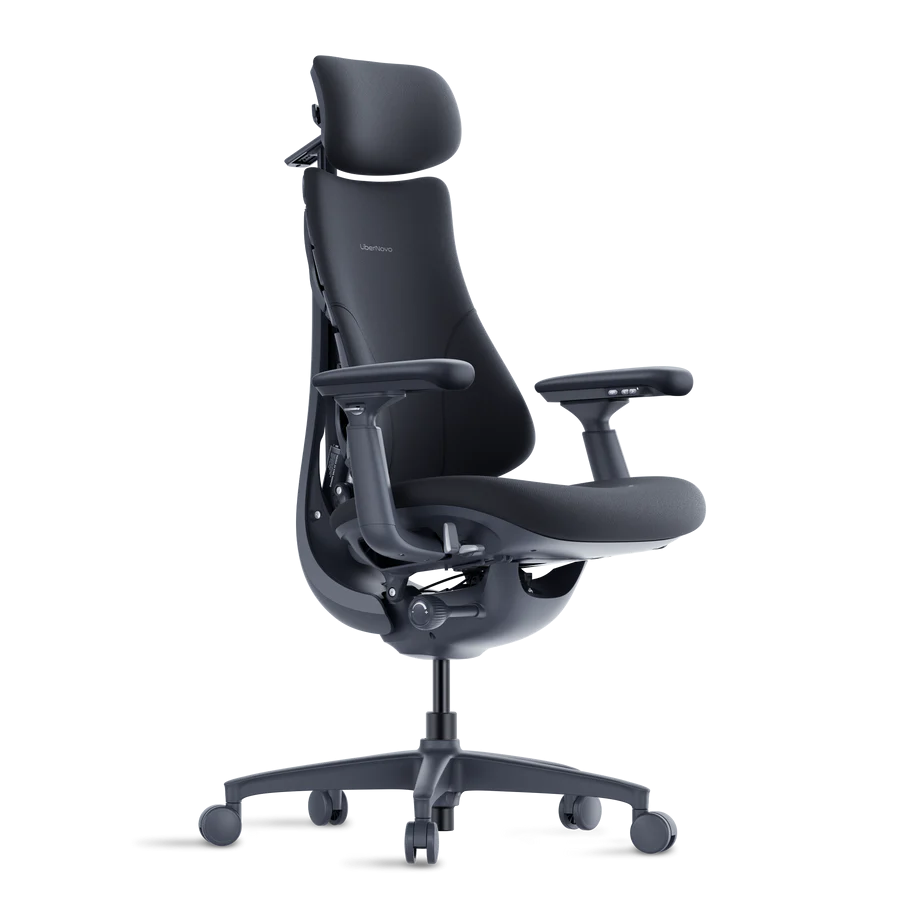
Makers of a New Motorized Office Chair With Bionic Spine Claim It’ll Ease Your Back Pain

The LiberNovo Omni is an ergonomic office chair from a newcomer to the market. The $1,099 chair is designed for movement and real-time posture correction with a motorized spine and lumbar support that the company says can relieve back pain.

I’ve been spending countless hours at my computer lately working on various projects, and my back is definitely paying the price. The tension runs from my shoulders down through my shoulder blades and all along my spine.

When this article popped up in my RSS feed, I immediately had to check it out. Here’s a newcomer to the office chair market with a twist: this chair is powered and automatically adjusts to your movements to maintain proper posture. It offers multiple positioning modes, from sitting completely upright to reclining at 160 degrees for relaxing or gaming sessions.

But it doesn’t stop there. The chair also features a built-in massager and what they call a “bionic spine” that’s designed to adapt to your movements, optimizing both posture and comfort throughout the day.

The only downside? The price tag. However, when you compare it to other premium brands like Herman Miller or Steelcase, it’s actually competitively priced. I own a Herman Miller at home, and while it’s built like a tank and virtually indestructible, I wouldn’t rank it among the most comfortable chairs I’ve ever used. It’s a solid desk chair, but not what I’d call exceptionally comfortable.

This new chair normally retails for $1,099, though you can pre-order it for $849. The company raised an impressive $8.5 million during their Kickstarter campaign, which speaks to the market demand.

I’m still on the fence about purchasing one, but it definitely caught my attention, especially given my recent discomfort. If it delivers on its promises, I genuinely hope they succeed.

So, What Did I Get?

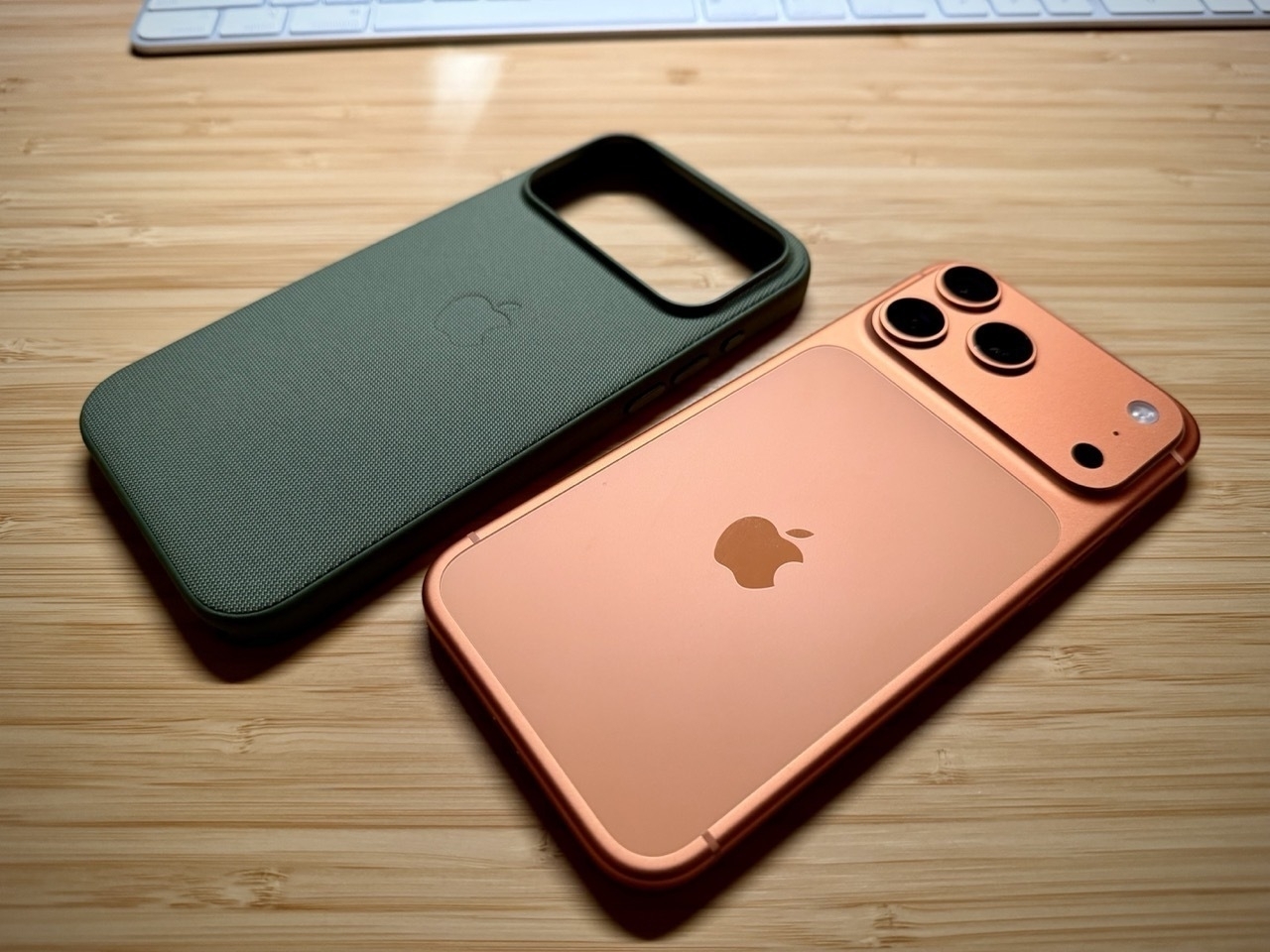
Yesterday, I mentioned that I decided to go with the iPhone 17 Pro Max instead of the iPhone Air because of the two extra cameras and the longer battery life. So, this is what I got…

Last year, I chose the Fine Woven case and hated it. I returned it within days of owning it and bought the Apple clear case. This year, I ordered the clear case again, but after seeing my wife’s Tech Woven case, I returned the clear one and bought that one instead. It feels so good on the phone. Together, they feel like one unit, it fit so well. Time will tell how the case will hold up, but right now, I highly recommend it.

iPhone 17 Pro vs. iPhone Air

iPhone 17 Pro vs. iPhone Air: Here is every key difference

Overall, the biggest differentiators between iPhone 17 Pro and iPhone Air are easily battery life and cameras. Which model you choose will likely have a lot to do with how important those differences are to you.

I was torn between which iPhone to order this year. On one hand, I’m used to the Pro variants, but should I get the new iPhone 17 Air? It’s incredibly thin and represents Apple’s latest innovation. Surely it has to be better, right? Apple marketed it as having “Pro performance inside” with a much sleeker design, and it certainly looks beautiful.

If you’re in the same position I was, I recommend checking out the article above since it breaks down everything between the Air and Pro models.

For my needs, I realized I’d miss the versatility that comes with the Pro’s camera system. I use all the cameras at different times, so losing those options would be a significant downgrade. I also have long days and depend on my phone’s battery to last from morning until night.

That’s why I opted for the iPhone 17 Pro Max, and I’m happy with my decision. It features three cameras instead of just one, and the battery life is substantially better than the Air’s, according to reviewers like Marques Brownlee who have started testing its longevity. See his iPhone Air video here.

I do have to say, though, people seem to be impressed at how durable the iPhone Air is, despite being so thin. It “SHOCKED” JerryRigEverything on his durability test.

Solar Powered Dashcam

Baseus’ solar-powered dash cam keeps an eye on your parked car for up to two weeks

The PrimeTrip VD1 Pro includes both a rechargeable battery and a high-efficiency solar panel it uses to record incidents when motion or impacts are detected for up to 14 days while your car is parked, without draining your vehicle’s battery.

I think that this is a pretty practical idea, especially if you travel and tend to leave your car at the airport for any length of time.

iPadOS 26 Is Blurring The Line

iPadOS 26 has officially turned the iPad into the most Mac-like device ever — but there’s more happening under the surface.

Fernando from 9to5Mac hits it right on the head. The iPad is getting closer and closer to being very Mac-like with the new iPadOS 26 and I really like it.

The 5 biggest improvements for me have to be…

  • True background processes, so you don’t have to babysit things like video exports.
  • The Files app acts more like the Finder with functionality like being able to pin files and rearrange column headers.
  • The new windowing system lets you resize and reposition apps to your liking.
  • The top menu bar for easy access to app-specific shortcuts and keyboard commands.
  • Preview app to scan documents and annotate PDFs.

Protect Your New Phone

You’re Going to Drop Your New iPhone 17. Don’t Skimp on the Case

Remember to grab something to protect your new device. Many of your favorite brands, like Casetify, have already released new cases for the upcoming iPhone 17 models. Even Apple has dropped its new line of cases, with some fun new accessories, too.

Man, I felt like this article was written just for me. When the new phones were announced and they mentioned the Unibody of the Pro phones, I immediately thought of going caseless for the first time ever. I figured that since Apple keeps touting how durable everything is, I could just run around with a “naked” phone. I mean, I do have Apple Care, right? That’s better than a case, isn’t it? These are all the things that ran through my head, but then I chickened out after a bit. Reading this article just confirmed my bias, and I ordered a case for it.

Actually, I ordered two cases. Originally, I ordered the silicone case in orange to complement my phone. However, when I received it yesterday, I remembered why I don’t like silicone cases. They feel fragile. They feel great when they’re new, but then they get all stretchy and loose. At least that has been my experience in the past. Then, I took a second look at my wife’s Tech Woven case, and it felt good in the hand. I even tried to scratch it with my nail, and it didn’t even leave a mark. So, I ordered one for myself and I’m going to return the silicone one.

Apple Magic Keyboard or ESR iPad Keyboard

I’m continuing to use my iPad more as a creation device than a consumption device. So I’ve made a couple of changes to better fit this new purpose.

First, I got a “paper”-like magnetically attached screen protector. This allows me to easily remove it when I’m not in the mood to write notes with my Apple Pencil. It’s been working out pretty well so far. It does make the screen look a little darker, but the magnetic attachment is perfect because I can just remove it at will. It also gets a bit irritating to use the iPad as a touch device because the texture is rough, and after a while it becomes uncomfortable on the fingers. When I’m writing in GoodNotes, however, I really like the experience. It doesn’t feel exactly like paper, of course, but it does provide more friction and makes my writing experience much nicer.

I also wanted to be able to type out ideas, blog posts and my daily notes in Obsidian using the iPad. When I’m on my computers, I use those, but when I’m out and about or in the car stuck in traffic—I can easily take out my iPad and type something out. I’ve never been a fan of the onscreen keyboard, so I decided to buy both the Apple Magic Keyboard and the ESR Bluetooth iPad Keyboard. In other words, I bought the cheapest popular option as well as the most expensive popular option so I could try both extremes and see which one I like best. Well… there are definitely pros and cons to both and it is not as clear cut a decision, as you may think.

Apple Magic Keyboard

Pros

  • Premium build quality with solid construction
  • Keys have excellent tactile feel (not squishy)
  • Sleek, lightweight design
  • Automatic disconnect when detached from iPad
  • Optimal viewing angle for both lap and desk use
  • No accidental trackpad activation issues

Cons

  • Expensive at $300 (3x the cost of ESR)
  • Provides no protection for the iPad
  • No storage or attachment point for Apple Pencil
  • Leaves iPad vulnerable to damage when not in use

ESR Keyboard

Pros

  • Budget-friendly at only $100
  • Full protection for the iPad with case design
  • Magnetic Apple Pencil attachment and storage flap
  • Very responsive key input
  • Built-in battery for extended use

Cons

  • Much thicker and heavier (feels like 2x the weight)
  • Squishy key feel with loose rubber covering
  • Frequent accidental trackpad activation
  • Too steep viewing angle on flat surfaces
  • Manual power-off required (doesn’t auto-disconnect)
  • Flimsy construction around charging port/speaker area
  • Difficult iPad insertion that almost damaged my “paper” screen protector
  • Lower overall build quality

Bottom Line

The Apple Magic Keyboard offers premium quality and user experience at a premium price, while the ESR keyboard provides good value and protection features but with notable usability compromises. Your choice depends on whether you prioritize build quality and user experience (Apple) or budget-friendliness and device protection (ESR). For me, it came down to choosing the Apple Magic Keyboard, even though I do not consider it a perfect solution for the price. I am still testing and exploring my options out there.

Signal Cloud Backup

Signal adds secure cloud backups to save and restore chats

Signal has introduced a new opt-in feature that helps users create end-to-end encrypted backups of their chats, allowing them to restore messages even if their phones are damaged or lost.

I have been a Signal user and supporter for years now, but restoring it to a new iPhone has always been a pain. I hope that this new cloud backup makes it easier while keeping it secure. However, the most important thing here is that you can’t restore your Signal data if your phone is damaged or lost. This hopes to midigate that.

September 2025 Apple Event

Here are my takeaways for Apple’s September 9, 2025 event. It is not a comprehensive list of everything they announced, but what I thought was interesting.

Air Pods Pro 3

• Heart rate monitor • 4× better Active Noise Cancelling (ANC) • Language translation • Includes 5 ear tips • 8 hours of battery with ANC on • 10 hours of battery with transparency on • Same $249 price tag

Apple watch

Series 11

  • 5G connectivity
  • 24-hr. battery life
  • Hypertension notifications
  • Sleep score

SE 3

  • 18 hr. battery life
  • Supports fast charging
  • 15 minute charge can get you up to 8 hours of battery
  • 5G connectivity
  • Sleep Apnea notifications
  • Sleep score

Ultra 3

  • Larger screen
  • 42 hours of battery life
  • 5G connectivity
  • Satelite comms.
  • Hypertension notifications
  • $799

iPhones

iPhone 17

  • Comes in 5 colors
  • 6.3 inch display
  • Pro-Motion (120 Hz)
  • 3,000 nits peak brightness
  • 8 more hours of battery
  • 20 minutes of charging can get you up to 50% battery
  • 48 MP Fusion camera
  • 2x telephoto
  • 24 MP default camera
  • Front Center Stage camera has square sensor (2x)
    • 18 MP front camera
    • Image stabilization on front cam.
  • 256 GB base model

iPhone Air

  • 5.6 mm thick
  • 6.5 inch display
  • Pro-Motion display
  • 3,000 nits peak
  • ceramic shield on front and back
  • New “plateau” on the back houses rear and front cameras, silicon and speaker
  • Frame is Titanium
  • Comes in 4 colors
  • A 19 Pro CPU
  • N1 wireless chip
  • C1X Modem
  • 48 MP Fusion camera
  • Dual capture video using front and rear cameras simultaneously
  • eSIM worldwide
  • “All Day Battery Life”
  • Accessories
    • magsafe battery pack
    • clear case
    • bumper
    • cross body strap

iPhone 17 Pro

  • Aluminum Unibody
  • vapor chamber for cooling
  • comes in 3 colors… silver, blue, orange
  • A19 Pro CPU
  • ceramic shield on front and back.
  • 39 hours of video playback
  • 18 MP Center Stage front camera
  • All 3 rear cameras are 48 MP and are Fusion
  • 4× zoom at 100mm and 8× zoom at 200mm
Follow Me On Mastodon | Buy Me A Coffee