Mastodon

Signal Cloud Backup

Signal adds secure cloud backups to save and restore chats

Signal has introduced a new opt-in feature that helps users create end-to-end encrypted backups of their chats, allowing them to restore messages even if their phones are damaged or lost.

I have been a Signal user and supporter for years now, but restoring it to a new iPhone has always been a pain. I hope that this new cloud backup makes it easier while keeping it secure. However, the most important thing here is that you can’t restore your Signal data if your phone is damaged or lost. This hopes to midigate that.

Tiny Vinyl

Tiny Vinyl is a new pocketable record format for the Spotify age

“I’ve already pre-ordered two Tiny Vinyl records,” Fred Whitacre Jr, a teacher, drummer, and record collector from Warren, Ohio, said. “But, I don’t think it’s something I’m going to delve very heavily into. I always like when vinyl pressings try something new, but for me, I’m probably going to stick with LPs and 45s.”

Tiny vinyl? That’s the coolest thing I’ve heard of in a while! I didn’t grow up with vinyl myself, but I inherited my first few records from my dad. Now we have a collection of about 100 or so. The funny thing is that my teenagers love vinyl too. I didn’t encourage them to listen to records or anything—they just picked up the love themselves. It’s amusing watching them flip through albums like in the old days, selecting their favorites to take to their rooms from time to time. I hope tiny vinyl records are compelling enough to gain traction and stick around for a while. I, for one, am rooting for them.

National Preparedness Month

National Preparedness Month: 12 Ways to Prepare

Amateur radio serves as a powerful tool and national resource before and When All Else Fails®, but being prepared goes beyond radio.

Great reminder to take time and make sure you and your family are prepared for any kind of emergency, especially this month. A dozen things they mention in the article are

• Sign up for alerts and warnings • Make a plan • Save for a rainy day • Practice emergency drills • Test family communication plan • Safeguard documents • Plan with neighbors • Make your home safer • Know evacuation routes • Assemble or update supplies • Get involved in your community • Document and insure property

Parachute Backup

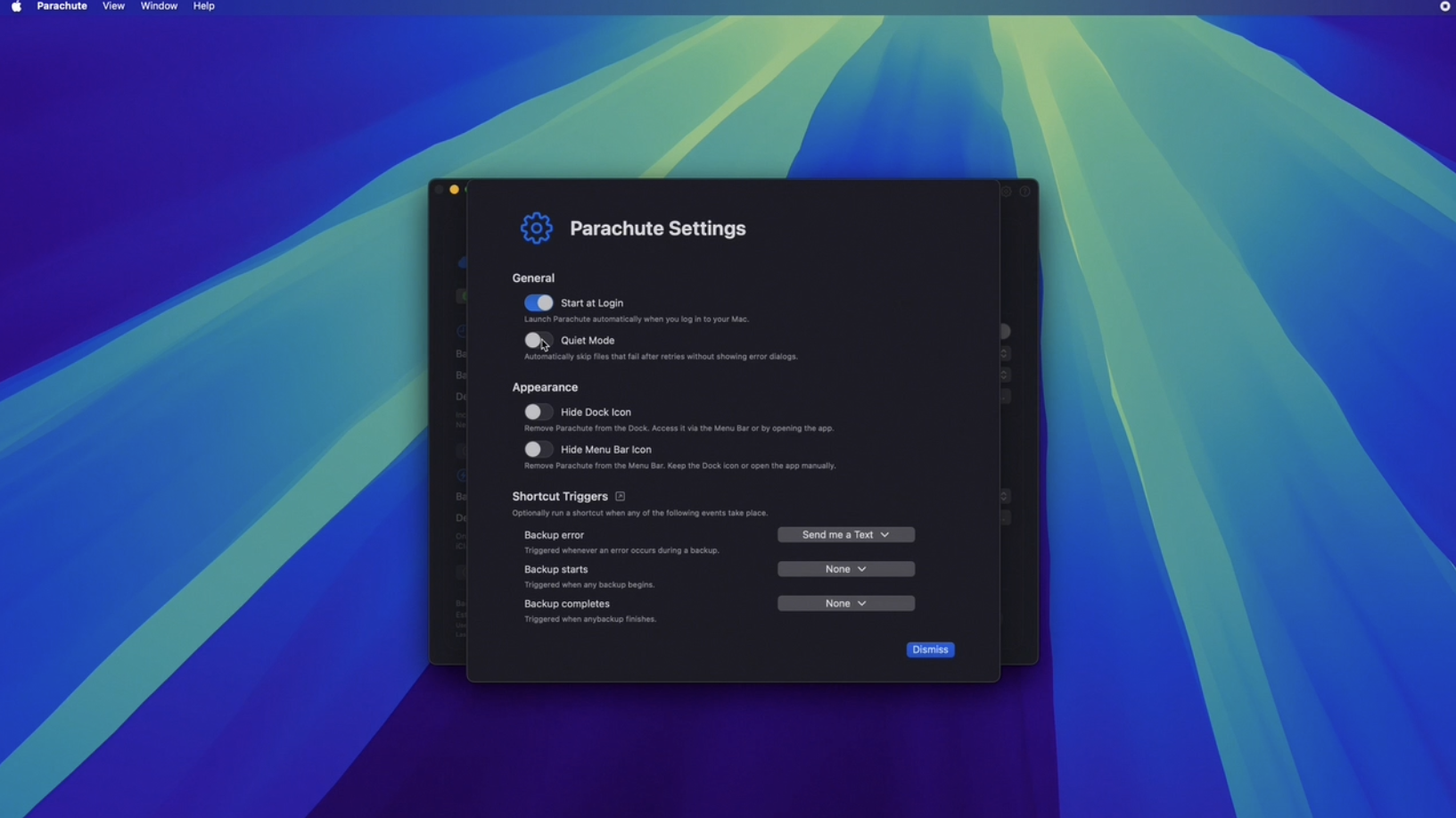
Just learned about Parachute Backup from the Mac Power Users and it is great! It downloaded the entire iCloud Photo library onto my NAS, which is worth the price of admission all by itself. But, it didn’t stop there. It also organized all of my photos and videos by year and month. Now, I have my backup and I can use the media in it’s organized state with other apps like Plex. I love it and highly recommend it.

September 2025 Apple Event

Here are my takeaways for Apple’s September 9, 2025 event. It is not a comprehensive list of everything they announced, but what I thought was interesting.

Air Pods Pro 3

• Heart rate monitor • 4× better Active Noise Cancelling (ANC) • Language translation • Includes 5 ear tips • 8 hours of battery with ANC on • 10 hours of battery with transparency on • Same $249 price tag

Apple watch

Series 11

  • 5G connectivity
  • 24-hr. battery life
  • Hypertension notifications
  • Sleep score

SE 3

  • 18 hr. battery life
  • Supports fast charging
  • 15 minute charge can get you up to 8 hours of battery
  • 5G connectivity
  • Sleep Apnea notifications
  • Sleep score

Ultra 3

  • Larger screen
  • 42 hours of battery life
  • 5G connectivity
  • Satelite comms.
  • Hypertension notifications
  • $799

iPhones

iPhone 17

  • Comes in 5 colors
  • 6.3 inch display
  • Pro-Motion (120 Hz)
  • 3,000 nits peak brightness
  • 8 more hours of battery
  • 20 minutes of charging can get you up to 50% battery
  • 48 MP Fusion camera
  • 2x telephoto
  • 24 MP default camera
  • Front Center Stage camera has square sensor (2x)
    • 18 MP front camera
    • Image stabilization on front cam.
  • 256 GB base model

iPhone Air

  • 5.6 mm thick
  • 6.5 inch display
  • Pro-Motion display
  • 3,000 nits peak
  • ceramic shield on front and back
  • New “plateau” on the back houses rear and front cameras, silicon and speaker
  • Frame is Titanium
  • Comes in 4 colors
  • A 19 Pro CPU
  • N1 wireless chip
  • C1X Modem
  • 48 MP Fusion camera
  • Dual capture video using front and rear cameras simultaneously
  • eSIM worldwide
  • “All Day Battery Life”
  • Accessories
    • magsafe battery pack
    • clear case
    • bumper
    • cross body strap

iPhone 17 Pro

  • Aluminum Unibody
  • vapor chamber for cooling
  • comes in 3 colors… silver, blue, orange
  • A19 Pro CPU
  • ceramic shield on front and back.
  • 39 hours of video playback
  • 18 MP Center Stage front camera
  • All 3 rear cameras are 48 MP and are Fusion
  • 4× zoom at 100mm and 8× zoom at 200mm

What I Don't Like About the reMarkable Paper Pro Move

Here are some things that I don’t like about the reMarkable Paper Pro Move.

  • The hefty price tag. At close to $650 for the tablet, pen, and folio bundle (including sales tax), it’s a significant investment.

  • Poor accessibility for visually impaired users. As someone with visual impairment, I find the menus extremely difficult to see, if I can see them at all. The background templates—like lined, grid, or dot paper—are virtually impossible for me to make out. This means I frequently need assistance from a sighted person or my assistive technology to navigate basic functions.

  • The subscription model. The $2.99 monthly fee for reMarkable’s Connect service is a sticking point for many users, myself included. However, the more I use it, the more I appreciate its benefits. With the free 100-day trial, I suspect it’ll become indispensable, and I’ll gladly pay for it once the trial ends.

  • Constant passcode entry. I understand the security reasoning, but having to enter the passcode every time I wake the tablet becomes tedious quickly.

  • My handwriting somehow gets worse. This one’s a “me” issue, but I don’t like how I write on the tablet. You’d think it would feel just like writing on paper, but for some reason, my handwriting actually deteriorates on the device.

  • Tiny menu fonts. The menus use incredibly small fonts that even some sighted people in my life struggle with—though maybe that’s because they’re over 40 years “young.” (See what I did there?)

  • It’s not silent like paper. While I dislike the click-clacking sound my iPad makes when writing on glass, this tablet produces similar noises. It’s not the mostly silent experience of writing on actual paper. Perhaps I need to write with a lighter touch—time will tell.

  • Durability concerns for daily use. I plan to carry this tablet everywhere, but it feels fragile with no IP rating for dust or water protection. I’m not planning beach trips or rain writing sessions, but it rains almost daily where I live, and sometimes I have to dash from my car to work. For this price point, I wish it offered some weather and dust protection.

  • Zoom lag issues. Since I need to zoom in on my writing periodically, I’ve noticed the tablet occasionally lags during this function. Sometimes it takes two or three attempts before it responds to my zoom gesture.

What I Like About the reMarkable Paper Pro Move

Here are the things I like about my new reMarkable Paper Pro Move, in no specific order.

  • It is small and portable. You can easily take it anywhere, especially in your EDC bag or purse.
  • Its compact size makes it convenient to carry everywhere with you. It even works out great on your bedside table since it does not take up a lot of room.
  • The pen has a nice weight to it and feels premium all around. It’s also super responsive.
  • The tablet itself is very responsive in everything I tried, from navigating the menus to seeing the ink appear on screen as you write. This also feels like a premium product.
  • I love the fact that the pen has a built-in “eraser.” All you have to do is flip it around like you would with a regular old-fashioned pencil to use it.
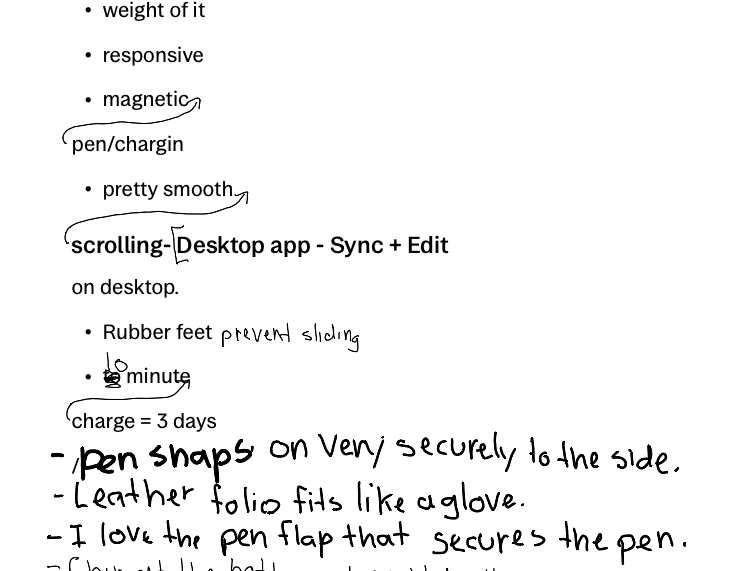
  • The handwriting-to-text conversion is fast and pretty accurate overall. It does make mistakes, but I think that has more to do with my bad handwriting (see screenshot below).
  • Being able to magnetically attach the pen to the side and have it charge is fantastic.
  • Two-finger scrolling of the page is very smooth for the most part.
  • Outward pinch to zoom in to your writing is great, especially when details are important.
  • The desktop app, paired with the Paper Pro Move and their Connect service, is nice. Syncing is generally fast, but sometimes I had to close the app and restart it to see changes. This was rare, but it did happen to me a couple of times.
  • Simple detail, but I like that it has rubber feet on the back, so it doesn’t slide when you write on it while it sits on your desk without the folio.
  • I haven’t verified this, but supposedly a 10-minute charge will give you 3 days of use.
  • The leather folio is excellent. It fits like a glove, and the magnets are strong and secure the tablet very well. I love the flap that conveniently fits over the pen to secure it with magnets. I also like the way it tucks behind when you have it open and are using the Paper Pro Move.
  • A lot of people complain about the paid Connect service that reMarkable offers, but I think it’s cool that they offer the first 100 days for free.

Tomorrow, I will share the things I do not like about the tablet, so don’t be shy and come on by.

Follow Me On Mastodon | Buy Me A Coffee